If you’ve forgotten your Cerely password, follow these steps to reset it:
1. Open the Cerely app on your device
2. On the login screen, tap ‘Forgot Password?’
3. Enter the email address associated with your Cerely account
4. Tap ‘Submit’ to receive a password reset link
5. Check your inbox, including spam or junk folders, for an email from Cerely
6. Open the email and tap the ‘Reset Password’ button
7. Enter your new password, then confirm it by typing it again
8. Tap ‘Submit’ to update your password
9. Follow the on-screen prompts to return to the Cerely login screen
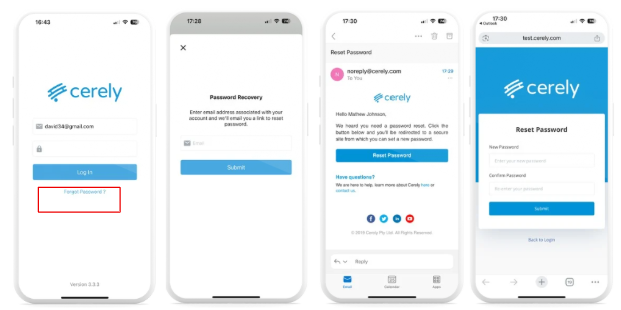
You can now log in using your email address and new password
Was this article helpful?
That’s Great!
Thank you for your feedback
Sorry! We couldn't be helpful
Thank you for your feedback
Feedback sent
We appreciate your effort and will try to fix the article